

Translate
Moldable
Fast, private text translation across dozens of languages
About
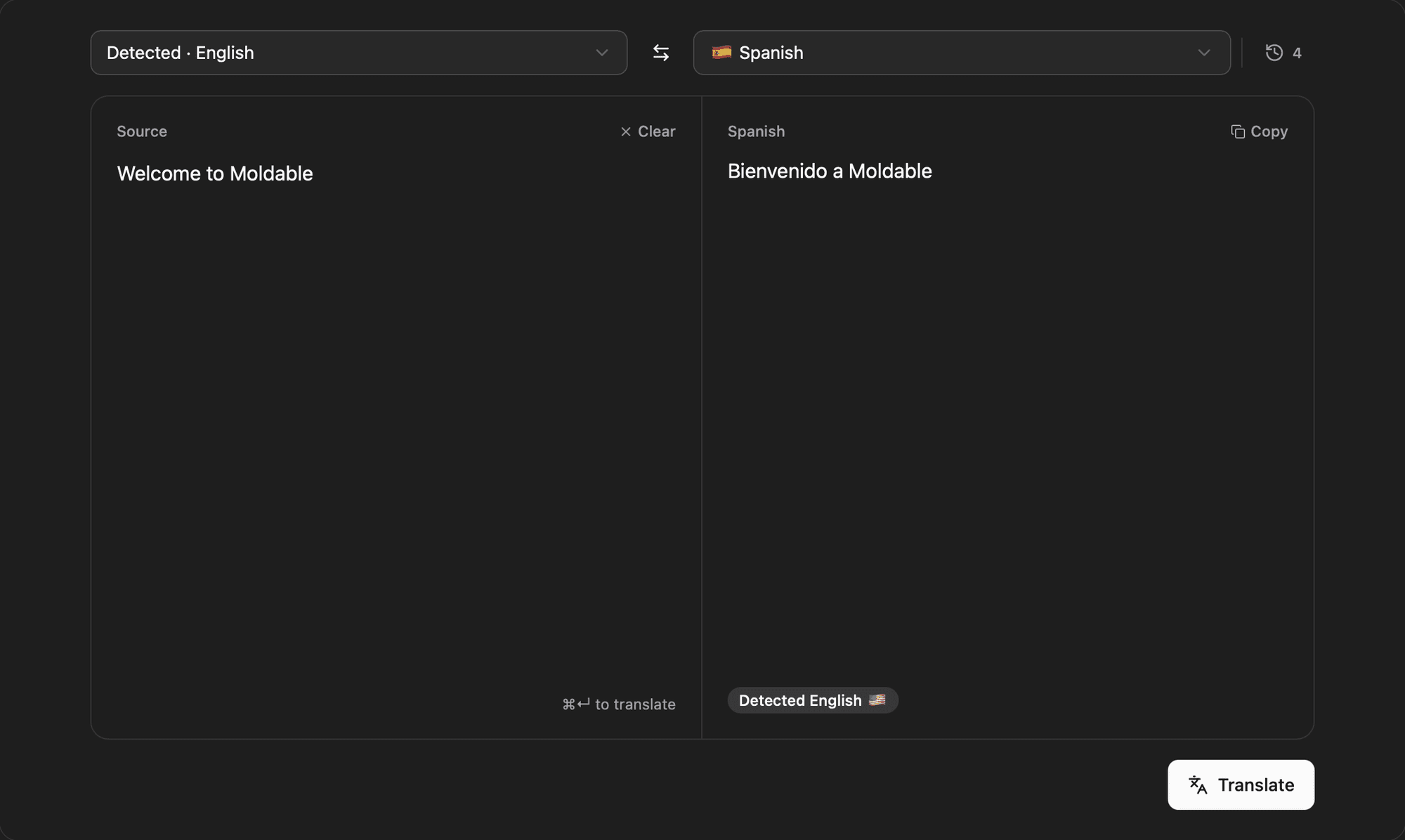
Translate is a fast, private text translator that puts the source and the result side by side in one split editor, with 23 languages a select away. Type on the left, read the translation on the right, and keep a local history of everything you've run, all on your machine.
Highlights
- Side-by-side editor with a source panel on the left and the translation on the right, with the target language named above the result so you read the original and the translation at a glance
- Pick from 23 languages with flags, or leave the source on "Detect language" and let DeepL identify it, shown as a "Detected · German" label and a flag badge on the result
- Swap source and target with one button, which flips the languages and moves the translation back into the input for a quick round trip
- Translate with the Translate button or ⌘↵ from the keyboard, copy the result with a Copy button that confirms with "Copied", and clear the input with one click
- Text that exceeds DeepL's request-size limit is tinted red in the editor so you can trim exactly what won't be sent instead of being silently cut, and right-to-left languages like Arabic flip the text direction automatically
- Every translation is saved to a History sheet grouped by Today, Yesterday, and date, where you can select a row to restore it into the editor, delete single entries, or clear all
Connects to: DeepL via the Moldable aivault. Your DeepL API key is stored locally in the vault and is never exposed to agents or sent anywhere but DeepL.
Translate can also offer text translation, language detection, and recent history to other Moldable apps you approve. Install it for a quick, private place to translate text and keep what you've translated.
Get this app
- 1. Download and open Moldable.
- 2. Open the Store and install Translate in one click.
- 3. It updates itself over time — nothing to maintain.
Connections
- DeepL API Key — Powers automatic text translation between languages
You'll be asked to connect these after installing. Keys are securely stored in aivault and never exposed to agents.
More apps
Artifacts
Turn a chat into a beautiful, self-contained, publishable web page or slide deck — dashboards, landing pages, specs, charts, data stories, games, and 3D scenes.

Affirmations
Daily affirmations across ten themes, saved to your favorites

Bookmarks
Save on X. Find it here.
Calculator
Everyday, scientific, and unit/currency math — with history